

// V-Setup 5 — Windows installer maker
V-Setup 5
V-Setup 5: the installer of any Windows software, through a tabbed wizard. A single 64-bit setup.exe, uninstaller, code signing, password, no script.
V-Setup 5 builds the installer of your Windows software from a tabbed wizard. You describe what must be installed and how the installation should look; V-Setup produces a single 64-bit setup.exe with its uninstaller. No script, no runtime, no DLL to ship.
For any Windows software
V-Setup is written with Visual DialogScript 7, but it does not only install VDS programs. A Delphi or C++ executable, a .NET application, a packaged Python program, a utility, a game, a set of documents: anything that gets copied onto a Windows PC can be distributed with V-Setup. It is the installer we use ourselves for Visual DialogScript 7.
The product is independent from VDS: it is downloaded, evaluated and purchased separately.
A wizard, not a script
Everything is set in seven tabs. A project is saved as a .vsf file that you rebuild with one click for each new version of your software.
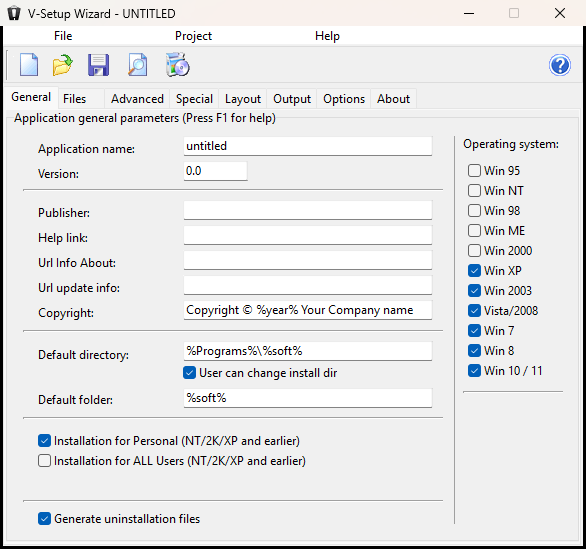
- General: application name and version, publisher, help and update links, copyright, default installation folder (changeable by the user or not), Start menu folder, uninstaller generation.
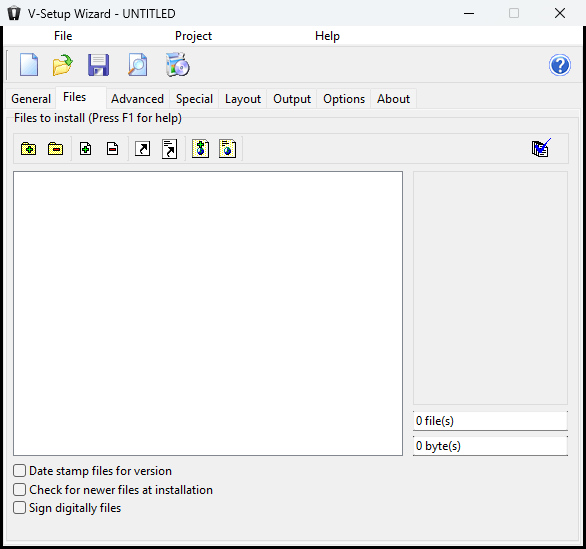
- Files: the files and folders to install, shortcuts (Start menu, desktop), Internet shortcuts, file associations, registry and INI entries. A wizard can create the usual entries for you. Options: date stamping, newer-file check, digital signing.
- Advanced: programs to run before, during and after the installation, legal information screen, entry point, operations at uninstall time.
- Special: DLL and OCX registration, font installation.
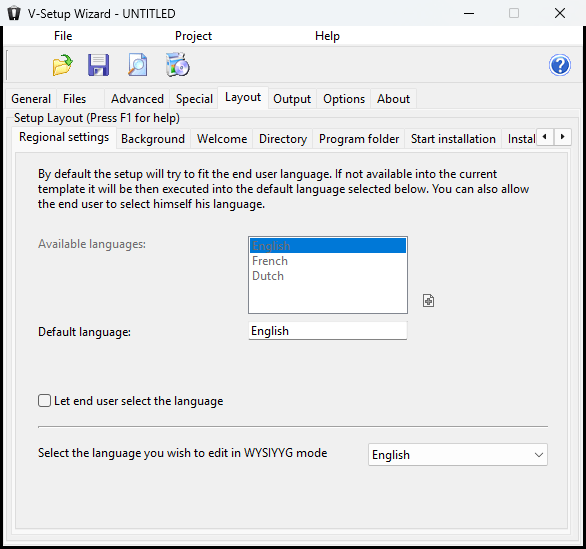
- Layout: the look of every screen seen by the end user (welcome, licence, folder, group, start, copy, finish, uninstall), pictures, texts, languages.
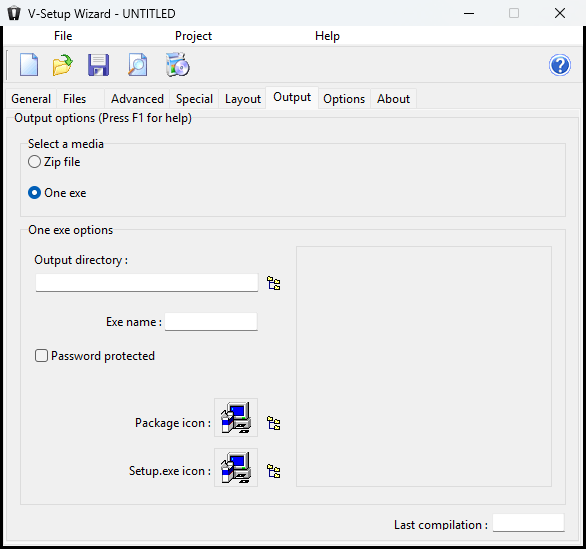
- Output: media (one exe or zip archive), output folder and name, password protection, icons.
- Options: V-Setup preferences and code signing configuration.
What your setup can do
- Copy files and complete folder trees, into the folder chosen by the user or into system folders (Windows, System, Program Files, Documents…)
- Create Start menu and desktop shortcuts, and Internet shortcuts
- Associate your file extensions with your program
- Write registry and INI entries, with variables resolved at install time (%soft%, %directory%, %year%…)
- Register DLLs/OCXs, install fonts
- Show a licence to accept and a readme, launch your program at the end, reboot when needed
- Install a complete uninstaller, listed in Windows "Apps & features"
An installation that looks like you
The end user sees an 8-page assistant: welcome, licence, destination folder, Start menu folder, summary, copy, finish, uninstall. Every text and picture is edited by a simple click in the Layout tab, WYSIWYG. Six graphic templates are included (default, Smart Technical, Smart Technical 2, Racing, Dark Moon, Natural) and you can save your own.
The assistant exists in English, French and Dutch: the setup adapts to the user's language, or lets them choose.
Before compiling, the full-screen preview simulates the whole installation without changing anything on your machine.
One file, 64-bit, no runtime
The produced setup is a self-contained 64-bit executable: the installation engine followed by a zip archive of your files. Nothing to install beforehand on the user's machine. The archive can be password protected (AES-256): the setup asks for it before extracting anything. You can also produce a plain zip archive.
Code signing
V-Setup 5 signs the setup and each of your executables with the tool of your choice: a free command line (osslsigncode, signtool, Azure Artifact Signing, hardware token…) with tokens for the file, the certificate password (stored encrypted, never in the project) and the output. Three ready-made templates are provided. A signed setup runs without warnings on Windows 11 (SmartScreen, Smart App Control).
Automation
V-Setup can also be driven from the command line (AUTORUN mode): you compile a project from your build script, with the output folder and name, the media and the password given as parameters. Handy to produce a different build for each customer.
Try it, then buy it
Windows 10 / 11, 64-bit, ~14 MB. The evaluation version is complete and has no time limit: only the setups it produces display an "Unregistered version" banner.
The V-Setup 5 licence is perpetual, issued in the publisher's name, with no activation and no machine lock. You receive a vsetup5.lic file: copy it next to V-Setup, rebuild your projects, the banner is gone. One licence per publisher, whatever the number of programs you distribute.
The complete help file (VSETUP.chm) is installed with the program.
Build it with VDS 7.
The full IDE + language. Windows & Linux · 32/64-bit · Unicode.